
Lark Player
Screenshots
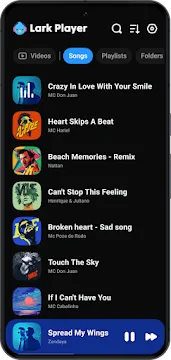
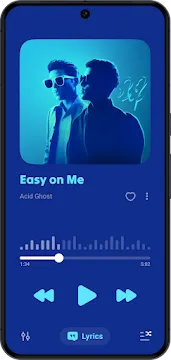
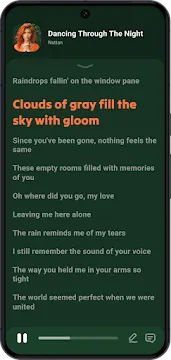
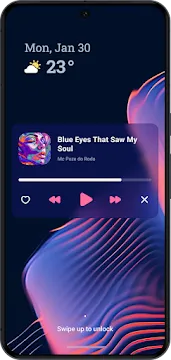
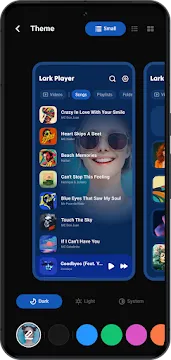
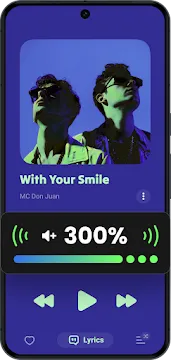
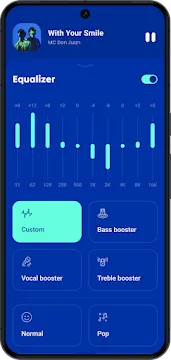
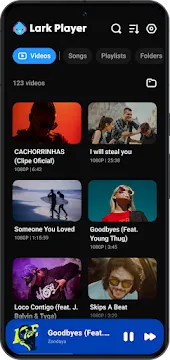
Lark Player is a top-rated multimedia app designed specifically for Android users. This versatile tool acts as both a music and video player for your offline files. Millions of people choose it because it offers a seamless way to enjoy high-quality entertainment without needing a constant internet connection.
The app stands out because it supports almost every popular media format. You can listen to MP3, WAV, or FLAC audio files with ease. It also handles MP4 and MKV videos smoothly. Its sleek design and user-friendly interface make it one of the most reliable media hubs available today.
How To Download And Install Lark Player APK For Android
Lark Player stands out as a premier offline music and video player for Android. It offers a sleek interface and powerful equalization tools. Since some users prefer direct installations over app stores, downloading the APK file provides a flexible alternative. Follow this comprehensive guide to get started.
Step 1: Prepare Your Android Device
Before you download, change one important setting. Android blocks unknown apps by default. You must allow installations from unknown sources.
Here is how to do it:
- Open your Settings app.
- Tap on Security or Privacy.
- Find Install unknown apps or Unknown sources.
- Select your browser or file manager.
- Toggle the permission On.
As a result, your phone can now install APK files.
Step 2: Download the Lark Player APK
Once your settings are ready, you can proceed with the installation process. Follow these simple steps to ensure a smooth setup.
- Open Chrome, Firefox, Edge, or any browser.
- Visit Filetomob.com.
- Type “Lark Player APK Download” into the search bar.
- Navigate to the app page..
- Tap the Download APK button for the latest version.
Wait for the download to finish. You will see a notification. Do not open the file yet.
Step 3: Install the APK File
Installation takes only a few seconds. Follow these steps carefully.
- Swipe down from the top of your screen.
- Tap the downloaded Lark Player APK file.
- A warning pop-up may appear. Read it and tap Install.
- The installation process begins immediately.
- Finally, tap Open when you see “App installed.”
Alternatively, open your Downloads folder. Tap the APK file there. The result is the same.
Troubleshooting Common Issues
Sometimes, minor errors occur during the installation process. Here is how to fix them quickly.
- “App Not Installed”: This usually happens if you already have a version of Lark Player. Uninstall the old version first, then try the APK again.
- “Parse Error”: This indicates the downloaded file is corrupted. Delete the file and download it again using a stable connection.
- Insufficient Space: Ensure you have at least 100MB of free space on your internal storage before starting the download.
By following these steps, you can enjoy a high-quality media experience on your Android device. Lark Player transforms your smartphone into a portable entertainment hub with just a few taps.
Key Tips for a Better Experience
To keep your app running smoothly, consider these best practices:
- Update Regularly: Occasionally check for newer versions of the APK to access the latest features and security patches.
- Clear Cache: If the app feels sluggish, go to your phone settings and clear the app cache to free up memory.
- Save Storage: Move your music files to an SD card. Lark Player can easily detect and play media from external storage.
- Battery Optimization: If the player stops in the background, exclude it from your phone’s “Battery Optimization” list in settings.
Get Started with Lark Player for Android After Installation
You just installed Lark Player. Great choice. Now, let’s set it up properly. This guide helps you play music, manage playlists, and enjoy offline audio. Follow these simple steps.
First, Open the App
Tap the Lark Player icon on your home screen. The main dashboard appears immediately. You will see your device’s audio files. No complex setup is needed.
Grant Necessary Permissions
The app needs access to your storage. This lets it find songs, podcasts, and videos.
- Tap “Allow” when the pop-up appears.
- If you skip this, go to your phone’s settings.
- Enable storage permission manually.
Without permission, Lark Player cannot show your media.
Scan Your Music Automatically
After granting access, Lark Player scans your device. It collects all supported audio files. This takes only a few seconds.
Once the scan finishes, you see:
- Songs – All tracks listed alphabetically.
- Folders – Music grouped by your file structure.
- Artists – Tracks sorted by performer name.
Build Your First Playlist
Playlists keep your music organized. Here is how to create one:
- Go to the “Playlists” tab.
- Tap the “+” icon or “New Playlist.”
- Name your playlist (for example, “Morning Run” or “Chill Vibes”).
- Tap “Add Songs” and select your favorite tracks.
- Press “Done” to save.
You can edit or delete playlists anytime.
Play a Song Immediately
Tap any song title. The player screen opens. Use the large buttons:
- Play / Pause – Control playback.
- Next / Previous – Skip or go back.
- Shuffle – Mix up the order.
- Repeat – Loop one song or the whole list.
The progress bar lets you jump to any part of the track.
Adjust the Sound Quality
Lark Player includes a built-in equalizer. To improve your audio:
- Tap the equalizer icon (usually three bars or “EQ”).
- Choose a preset: Normal, Rock, Pop, Jazz, or Classical.
- Or slide the frequency bands manually for custom sound.
Better sound makes every song more enjoyable.
Use the Floating Window
You can keep listening while using other apps. Tap the floating icon (small music note) during playback. A mini player appears on your screen. Drag it anywhere. Tap it to pause, play, or skip tracks.
Play Videos Too
Lark Player is not just for audio. It also plays local videos. Switch to the “Videos” tab at the top. Tap any video file. Use the same playback controls.
This works great for movies, clips, or downloaded lectures.
Set a Sleep Timer
Do you listen to music before bed? Use the sleep timer.
- Tap the three dots (menu) on the player screen.
- Select “Sleep Timer.”
- Choose a time: 15, 30, 45 minutes, or “End of track.”
The app stops playing automatically. Your battery stays safe.
Customize the Theme
Make Lark Player look how you want. Open the side menu (three lines in the corner). Tap “Themes.” You can pick:
- Dark mode for night listening.
- Light mode for daytime.
- Accent colors (blue, green, purple, etc.).
Your changes save right away.
Organize with Tags
Sometimes song information is wrong. Fix it easily.
- Long press on a song.
- Tap “Edit Tags.”
- Change the title, artist, album, or cover art.
- Press “Save.”
This keeps your library neat and professional.
Play Without Internet
Lark Player works fully offline. Your music stays on your device. No Wi-Fi or data is required. This is perfect for commutes, flights, or saving mobile data.
Remove Ads (Optional)
The free version shows occasional ads. To remove them:
- Tap the “Remove Ads” button in the menu.
- Follow the in-app purchase steps.
This is optional. The app works fine without paying.
Final Tips for New Users
- Use the search bar at the top to find a song fast.
- Swipe left on a song to queue it next.
- Back up your playlists via the settings menu.
- Update the app regularly from your store for new features.
You Are Ready
Now you know the basics. Open Lark Player, play your first song, and enjoy clean, organized audio. Use the equalizer, sleep timer, and playlists every day. The app is simple, fast, and reliable. Start listening now.
Lark Player for Android: Key Features
Lark Player is a top-rated media player for Android users. It offers a seamless way to enjoy both music and videos in one place. This app is lightweight, fast, and packed with advanced features. Whether you want to listen to offline tracks or watch high-definition videos, Lark Player handles it all effortlessly.
High-Performance Audio and Video Playback
Lark Player excels at playing media without any lag. It serves as a universal player that adapts to your needs.
- Supports Multiple Formats: You can play almost any file type. It handles popular audio formats like MP3, FLAC, and M4A. It also supports video files such as MP4 and AVI.
- Floating Player Mode: This feature allows you to multi-task. A small pop-up window stays on your screen while you use other apps. You can watch your favorite videos while chatting or browsing.
- Background Play Option: You do not need to keep the app open to hear your music. The background play feature keeps the audio running even when your screen is locked.
Intelligent Music Management
Organizing a large library can be difficult. Lark Player simplifies this process with smart automation.
- Auto-Scan and Organization: The app automatically scans your device for new files. It then categorizes them by artist, album, or folder. This makes finding a specific song much faster.
- Smart Playlists: You can create custom playlists for every mood. The app also generates smart playlists based on your listening habits and most-played tracks.
- Tag Editor: Keeping your library neat is easy with the built-in tag editor. You can manually edit ID3 tags and update missing album art to keep your collection looking professional.
Useful Extra Utilities
Lark Player goes beyond basic playback. It includes several tools to enhance your daily listening experience.
Personalized Audio and Visuals
The app features a powerful Equalizer. You can choose from many professional presets or manually adjust the 5-band or 10-band EQ. Furthermore, the Theme Engine lets you switch between dark and light modes. You can even choose specific color accents to match your style.
Better Control and Convenience
- Lyrics Display: Enjoy singing along with synchronized lyrics. The app searches for lyrics online or displays them from your offline files.
- Sleep Timer: You can set a specific time for the music to stop. This is perfect for users who like falling asleep to calming sounds without draining the battery.
- Lock Screen Controls: You can skip tracks or pause music directly from your lock screen. This ensures you have full control without needing to unlock your phone.
Universal Format Support
Lark Player eliminates the frustration of unsupported files. It acts as a universal hub for all your media. You do not need multiple apps to open different files.
- Audio Mastery: It plays high-quality formats like MP3, WAV, and FLAC. It even supports AC3 and AAC files.
- Video Versatility: You can watch videos in MP4, MKV, MOV, and 3GP without glitches.
- Offline Ease: The app organizes your local files automatically. You can browse by song, artist, album, or folder.
The Floating Player (PIP Mode)
Multitasking is easy with the Floating Player feature. This “Picture-in-Picture” mode keeps your video active while you use other apps.
- Social Scrolling: Watch a music video while you check your social media feeds.
- Adjustable Window: You can change the size of the floating window. You can also move it to any corner of your screen.
- Uninterrupted Audio: Listen to music in the background while you chat with friends.
Lyrics on Tap
Transform your phone into a portable stage with real-time synced lyrics. This feature is a favorite for fans who love to sing along.
- Instant Sync: The app matches lyrics to your offline songs automatically.
- Karaoke Style: Follow the words as they highlight in time with the music.
- Easy Edits: You can manually search for lyrics or adjust the timing to ensure perfect synchronization.
Advanced Equalizer
Personalize your audio experience with the Advanced Equalizer. This tool gives you full control over how your music sounds.
- Expert Presets: Choose from built-in modes like Jazz, Rock, Pop, and Classical.
- Bass Boost: Use the dedicated bass enhancement to add depth to your favorite tracks.
- Custom Settings: Adjust the frequency bands manually to create your own unique sound profile.
Lark Player is more than just a player; it is a complete entertainment center. It offers a smooth, customizable, and user-friendly experience for every Android user.
Lark Player for Android: Performance and User Experience
Aesthetic Flexibility: Day and Night Themes
Your screen should adapt to your environment. Lark Player provides a variety of themes to match your mood and the time of day.
- Vibrant Day Themes: Use bright, high-contrast skins during the day. These themes stay visible even under direct sunlight.
- Soothing Dark Mode: Switch to the dark theme at night. It reduces blue light exposure and saves your eyes from unnecessary strain.
- Custom Skins: You can personalize the player with different colors and backgrounds. This makes your music player feel like a true reflection of your personality.
By prioritizing eye comfort, Lark Player ensures you can enjoy long listening sessions without fatigue.
Intelligent File Management
Many Android users struggle with messy download folders. Lark Player acts as your personal digital librarian. It automatically scans your device and organizes chaotic files into a structured library.
Automatic Categorization
The app sorts your audio files into three main categories:
- Artists: Group all tracks by your favorite performers.
- Albums: View your collection by specific records and cover art.
- Genres: Find the right vibe by browsing through Rock, Pop, Jazz, or Classical.
Active Organization You no longer need to manually rename files or move folders. The app identifies metadata instantly. Consequently, you spend less time searching for songs and more time enjoying them.
The Video-to-MP3 Converter: A Hidden Gem
One of the most powerful features of Lark Player is its built-in conversion tool. Most users keep music videos on their phones but want to listen to them on the go.
- One-Tap Conversion: You can transform any video file into a high-quality audio track with a single click.
- Background Play: Once converted, you can play the audio while using other apps or when your screen is locked.
- Space Management: This feature helps you save storage. Audio tracks take up significantly less space than bulky video files.
This tool is perfect for turning live concert recordings or interviews into portable podcasts.
Precision Audio: The Built-In Equalizer
Every song sounds different depending on your headphones and environment. Lark Player includes a powerful 10-band equalizer to help you achieve the perfect sound.
- Genre-Specific Presets: Choose from modes like Rock, Jazz, Pop, or Hip-hop. These presets instantly adjust frequencies to highlight the best parts of each genre.
- Bass Booster: Enhance the low-end frequencies for a deeper, more resonant sound. This is perfect for dance music and action-heavy movie soundtracks.
- 360 Surround Sound: Enable virtual surround sound to create a more immersive, theater-like experience through your earbuds.
Interactive Features: Lyrics and Gestures
Lark Player bridges the gap between listening and engaging. It provides interactive tools that make controlling your media effortless.
Dynamic Lyric Sync
Stop searching for song words online. The app automatically fetches and syncs lyrics for your offline tracks.
- Sing Along: Lyrics scroll in real-time as the song plays.
- Manual Adjustments: You can manually add or edit timestamps if the lyrics are slightly out of sync.
Intuitive Gesture Controls
Control your media without looking at specific buttons. While watching videos or listening to music, you can use simple swipes:
- Volume & Brightness: Swipe up or down on the left or right side of the screen.
- Seeking: Swipe horizontally to jump forward or backward in a track.
- Double Tap: Quickly play or pause your content.
Multitasking with Floating Player
You don’t have to stop your music or video to reply to a text. The Floating Window (Picture-in-Picture) feature allows you to keep your media active while using other apps.
- Activate Popup Mode: Tap the window icon to shrink your video or music controls into a small, movable bubble.
- Adjustable Size: Drag the corners of the window to make it larger or smaller.
- Seamless Integration: The window stays on top of other apps, allowing you to browse the web or check social media simultaneously.
Smart Utility Features
Lark Player includes several “quality of life” tools that enhance your daily routine.
- Sleep Timer: Set a countdown to turn off your music automatically. This is ideal for those who like falling asleep to white noise or lo-fi beats.
- Ringtone Cutter: Found a chorus you love? You can set any local audio file as your phone’s ringtone directly from the player.
- Share Instantly: Use the built-in share button to send your favorite MP3s or video clips to friends via WhatsApp, Bluetooth, or social media.
By combining deep audio customization with smart multitasking tools, Lark Player ensures your Android device remains a powerhouse for entertainment.
Lark Player for Android: Pros and Cons You Should Know
Lark Player has become a go-to choice for millions of Android users. This versatile media player handles both audio and video files with ease. If you want a lightweight yet powerful app for your device, it is worth a look.
Below is a breakdown of the strengths and weaknesses of Lark Player to help you decide if it fits your needs.
The Pros: Why Users Love Lark Player
Lark Player stands out because it balances simplicity with high-end features. Here are the main benefits:
- Completely Free to Use You can access every core feature without spending a dime. Unlike many competitors, it does not hide its best tools behind a monthly subscription or a paywall.
- The “Play Together” Feature This app excels at multitasking. The “Play Together” functionality allows the player to work seamlessly while you use other apps. You can watch videos in a floating window or listen to music while scrolling through social media.
- Deep Sound Customization Audiophiles will appreciate the built-in equalizer. You can adjust frequencies, boost the bass, and use preset modes to match your music genre. It transforms a standard mobile listening experience into something much more professional.
- Wide File Support The app plays almost any format you throw at it. Whether you have MP3s, WAVs, or MP4 videos, Lark Player handles them without requiring extra codecs.
The Cons: Areas for Improvement
No app is perfect. While Lark Player offers great value, you should keep these limitations in mind:
- Presence of Advertisements Since the app is free, it relies on ads for revenue. Fortunately, these ads are usually non-intrusive and stay out of the way of your media. However, they are still present during navigation.
- No Direct Music Downloads Lark Player is a media player, not a downloader. It stays compliant with YouTube’s terms of service and legal standards. Consequently, you cannot use it to grab files directly from the internet for offline use.
- Library Management While the interface is clean, managing massive music libraries can sometimes feel slightly cluttered compared to premium, paid alternatives.
Final Verdict
Lark Player is an excellent choice for anyone who wants a free, all-in-one media solution. It offers a smooth experience and impressive sound controls. While the lack of a download feature might disappoint some, its ability to play offline files and stream content makes it a top-tier utility for Android.
Frequently Asked Questions About Lark Player For Android
What is Lark Player?
Lark Player is a lightweight and versatile multimedia player. It supports almost all major audio and video formats. Unlike basic system players, it provides advanced controls to customize your listening and viewing experience.
Is Lark Player free to use?
Yes, you can download and use Lark Player for free. It provides a wide range of features without requiring a subscription. However, the free version usually includes some advertisements to support the developers.
Does it work offline?
Lark Player functions perfectly as an offline media player. Once you save your files to your phone’s internal storage or SD card, you can play them anywhere without an internet connection.
Which file formats does it support?
Lark Player is highly compatible. It effortlessly handles various file types, including:
- Audio: MP3, WAV, FLAC, AC3, and AAC.
- Video: MP4, MKV, AVI, FLV, and MOV.
Can I customize the sound?
Yes, the app features a powerful built-in equalizer. You can choose from various presets like Jazz, Rock, or Pop. Additionally, you can manually adjust the frequencies to match your personal preference.
Does it support lyrics?
Lark Player can display lyrics while you listen to your favorite songs. It automatically searches for lyrics online, or you can manually load them if you have the .lrc file on your device.
Can I change the app’s appearance?
The app offers a variety of themes and skins. You can switch between light and dark modes or choose vibrant colors to match your style.
How do I manage my playlists?
Organizing your music is simple. You can create new playlists directly within the app. Just select your favorite tracks and add them to a custom list for easy access later.
Can I set a sleep timer?
Lark Player includes a convenient sleep timer. This feature allows you to fall asleep to music without worrying about your battery. The app will automatically stop playback after the time you set expires.
Does it have a floating player?
Yes, the app supports a “Floating Window” mode. This allows you to watch videos in a small, moveable window while you use other apps on your phone.
Why is the app not finding my music?
If your files do not appear, try the following steps:
- Grant the app permission to access your storage.
- Use the “Scan” feature in the settings to refresh your library.
- Ensure your files are stored in a compatible folder.
Does Lark Player drain the battery?
Lark Player is optimized for low battery consumption. Because it is lightweight, it uses fewer system resources than many other heavy media applications.
Can I share music through the app?
You can easily share your favorite tracks with friends. The app integrates with various social media and messaging platforms, allowing you to send files directly from the player interface.